Features
Everything the agent does, and how you keep your hand on the wheel.
These are the real screens and capabilities of SMB Automate. Your agent handles the repetitive customer and back-office work; the app is where you watch it, shape it, and approve what matters. Nothing outbound leaves without your say-so.
01 · AI Assistant
A chat with your business's brain.
The assistant is a direct line to your agent. Ask it what's going on, have it draft a message in your voice, get a plain-English summary of the week, or tell it to take an action, which it tees up for your approval.
- Drafts replies, estimates and posts in your voice.
- Summarizes leads, jobs and numbers on demand.
- Takes actions only after you approve them.
Ask · draft · approve
“Draft an estimate for the Cotesworth job and text it to the customer.”
→ Agent prepares the draft and waits for your tap.
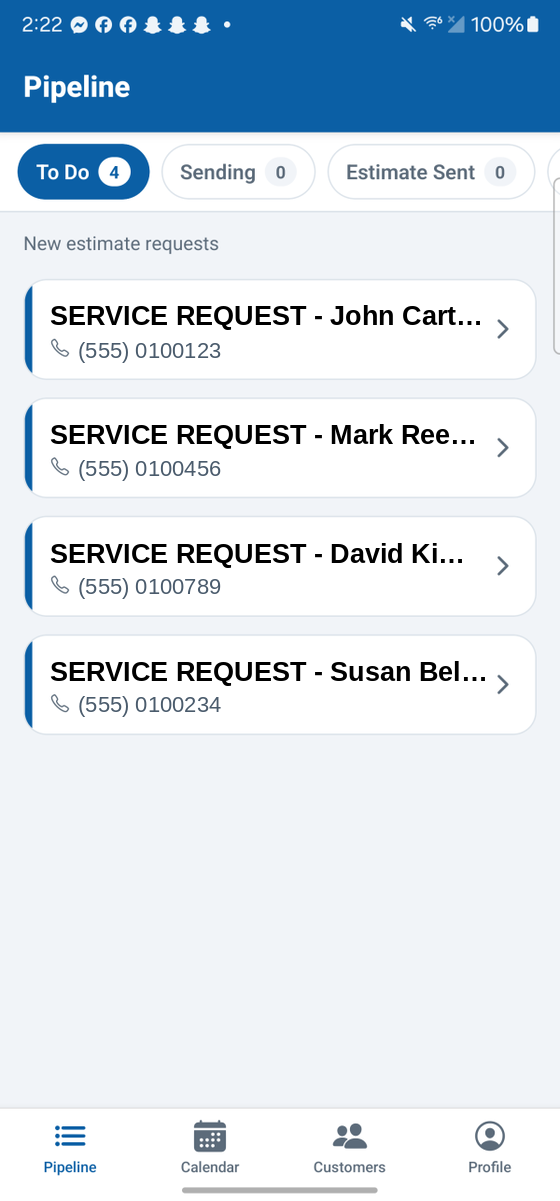
The pipeline board: the To Do column, with stage tabs across the top.
02 · Lead & job pipeline
Leads in one end, booked jobs out the other.
A Kanban-style board moves every lead through clear stages. The agent enriches each lead, drafts a branded estimate, texts the customer when you approve, drops the booking on your calendar, and carries it through to the invoice.
- Stages: To Do → Sending → Estimate Sent → Scheduled → To Bill.
- Each lead is enriched with property and contact detail automatically.
- Nothing advances past you. Approval gates the outbound steps.
03 · Estimates & quotes
A consistent, branded estimate in seconds.
Point the agent at a request or a finished job and it produces a clean estimate. Property details pulled in, services checked off, and every line priced by the rules you set. You read it, tweak it if you like, and approve.
- Prices computed by your rates, not guessed.
- Wording stays in your voice, on your branding.
- Consistent every time, no two-hour quote nights.
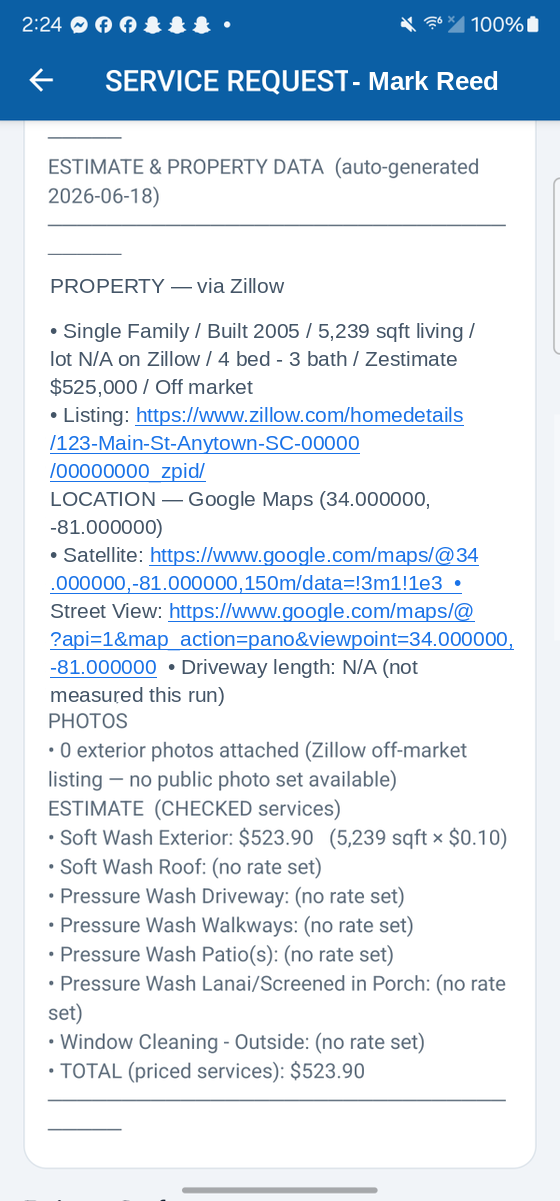
An auto-generated estimate: property data enriched, line items priced by your rules.
Synced with Google Calendar
04 · Scheduling & calendar
Bookings land where you already look.
Confirmed jobs, reminders and reschedules stay in sync with Google Calendar. The agent nudges customers ahead of time and handles the back-and-forth of moving an appointment.
- Two-way sync with Google Calendar.
- Automatic reminders cut no-shows.
- Reschedules handled without the phone tag.
05 · Customers
A customer list that builds itself.
Every job quietly feeds a directory of customers, deduplicated, searchable and editable. No spreadsheet to maintain, no double entries, no “what was that address again?”
- Built automatically from your jobs.
- Deduplicated so one customer is one record.
- Searchable and editable when you need to fix a detail.
Auto-built directory
Illustrative. Your directory reflects your own jobs.
“Just following up on the estimate we sent Tuesday.”
Drafted on schedule, in your words, waiting on your approval before it sends.
06 · Follow-ups
Quotes that go quiet get followed up, not forgotten.
When an estimate goes unanswered, the agent drafts the follow-up on a schedule you set, in your own wording, and holds it for your approval. Work you already won stops slipping through the cracks while you're on a job.
- Follow-ups on unanswered estimates, on your schedule.
- Your wording every time, not a generic template.
- Connect QuickBooks and the agent prepares invoices as drafts for you to review and send.
07 · Reviews
Turn finished jobs into reputation.
SMB Automate helps you request and manage customer reviews on your Google Business Profile, so a good job today becomes a review that brings the next customer tomorrow.
- Review requests timed to completed jobs.
- Manages your Google Business Profile reviews in one place.
- Keeps your reputation growing between jobs.
Google Business Profile
Request, track and respond, without leaving the app or forgetting to ask.
09 · Insights & revenue
The numbers behind the work.
Analytics on your pipeline, revenue and performance show how the business is really doing: what's coming in, what's booked, what's billed. No bookkeeping session required.
- Pipeline and revenue trends at a glance.
- Performance over 7 / 30 / 90 days and all-time.
- Clarity on where the work and the money are.
Pipeline · Revenue · Performance
Windowed by 7, 30 or 90 days, or all-time. The shape of your business, without the spreadsheet.
“New lead · Nick Hoffman”
Tap it and land right on the card. Nothing to hunt for.
10 · Push notifications
Know the moment something needs you.
Real-time alerts for a new lead, an estimate sent, something waiting on your review, or a new booking, each one deep-linked straight to the item so you act in one tap.
- Alerts for new leads, sends, reviews and bookings.
- Deep-linked to the exact card or screen.
- The signal to approve, right when it matters.
11 · Photos
Before, after, and every property in between.
Crew before/after photos and property photos attach to each job, so proof of work and site detail live right on the card, handy for estimates, disputes and social posts alike.
- Before/after photos captured by the crew.
- Property photos attached to the job.
- Proof of work, ready to reuse.
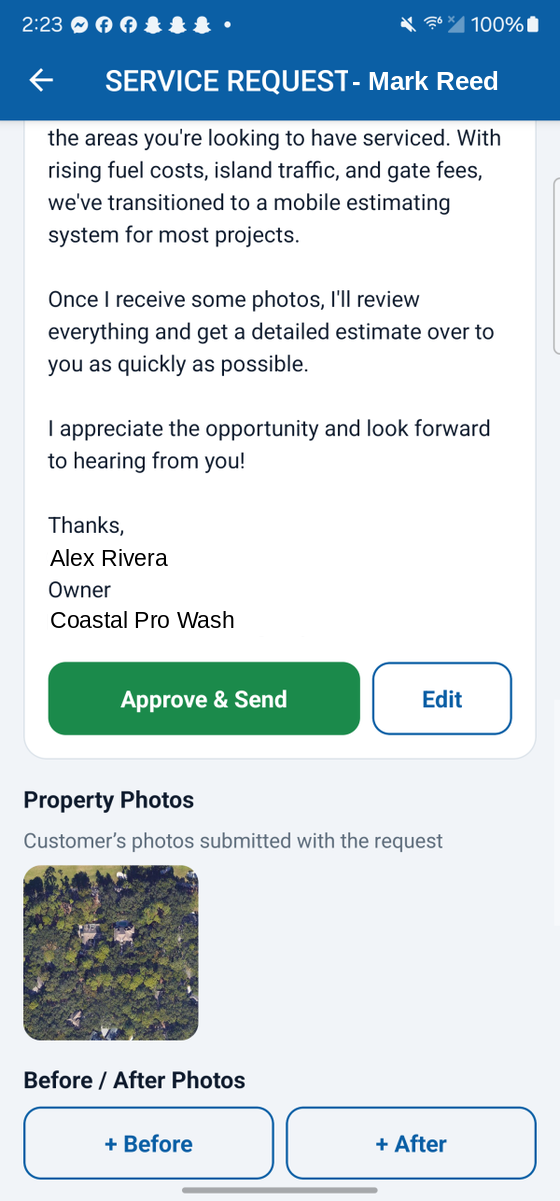
Property and before/after photos, attached right to the job card.
Your board. Your number. Your data.
Every business runs on its own branded configuration, fully isolated from every other.
12 · Multi-tenant / white-label
Your own app, not a shared one.
Each business gets its own branded app configuration: its own board, calendar, phone number and data, fully isolated from every other business on the platform.
- Branded to your business.
- Own board, calendar and phone number.
- Your data stays yours, isolated end to end.
13 · Receipts · rolling out
Snap the receipt. The bookkeeping is drafted.
Someone buys a part for a job and takes a photo of the receipt, right on the job card. The app reads it for you: the store, the date, the total, the tax and each item. It suggests where each item belongs, using the categories already in your own QuickBooks. You look it over, fix anything, and approve. This one is rolling out now.
- Anyone on the crew can add a receipt from the job card.
- Nothing goes to QuickBooks until an owner or admin approves it.
- Recorded under that job’s customer with the photo attached, so you can see what each job really cost.
Parts receipt · ready to approve
Read from the photo and sorted into your categories. Waiting on your approval before it is recorded.
Set up & run for you
A steady cadence
Nothing publishes until you approve it.
08 · Social media · rolling out
Show up online without babysitting it.
The agent drafts social posts on a steady cadence so you are not scrambling for something to post. Publishing stays behind your approval, with a separate kill switch that turns social off on its own. This one is rolling out now.