How it works
Set up and run for you. You just approve what matters.
SMB Automate isn't another tool you have to learn and maintain. Quantum Core MIP builds a custom AI agent around how your business actually runs, and the app is simply where you watch it work and keep control. Here's the whole thing, end to end.
Quantum Core MIP sets up your agent
We sit down with how your business really operates: the services you offer, the way you price them, your voice with customers, and the path a job takes from first call to final invoice. Then we build a custom agent around it and configure your app. You don't build, wire up, or integrate anything; it arrives ready to run.
Leads and jobs flow into the pipeline
New estimate requests and jobs land in your board's To Do column. The agent enriches each one, pulling in property and contact details, so every lead shows up with the context you'd otherwise dig for by hand.
The agent drafts and does the repetitive work
It writes the branded estimate in your voice, prices it by your rules, and prepares the text to the customer. It lines up the booking, the reminders, the follow-up on a quote that went quiet, the review request, and the week's social posts, all queued and ready, none of it sent yet.
You approve what matters from the app
A push notification tells you something needs a look. You open the card, read the draft, and tap Approve & Send, or edit it first. Anything that touches money, customers or your brand waits for that tap. Routine, low-stakes steps keep moving so you're not rubber-stamping all day.
It runs, and keeps getting better
Booked jobs move to Scheduled, finished ones to To Bill, and the busywork keeps turning in the background. As your business changes, Quantum Core MIP keeps tuning the agent with new services, new pricing and new patterns, so it fits you over time, not just on day one.
The part that matters most
Control isn't a setting. It's the whole design.
Automation only helps if you trust it. That's why SMB Automate is human-in-the-loop from the ground up: the agent prepares, you decide, and you can stop it cold at any time.
- Approval gates sit on every outbound action: estimates, texts, posts, invoices.
- A global kill switch pauses the agent instantly. One flip and it stops acting.
- Nothing hidden. You can see what ran, what's pending and what's queued next.
require approval
require approval
require approval
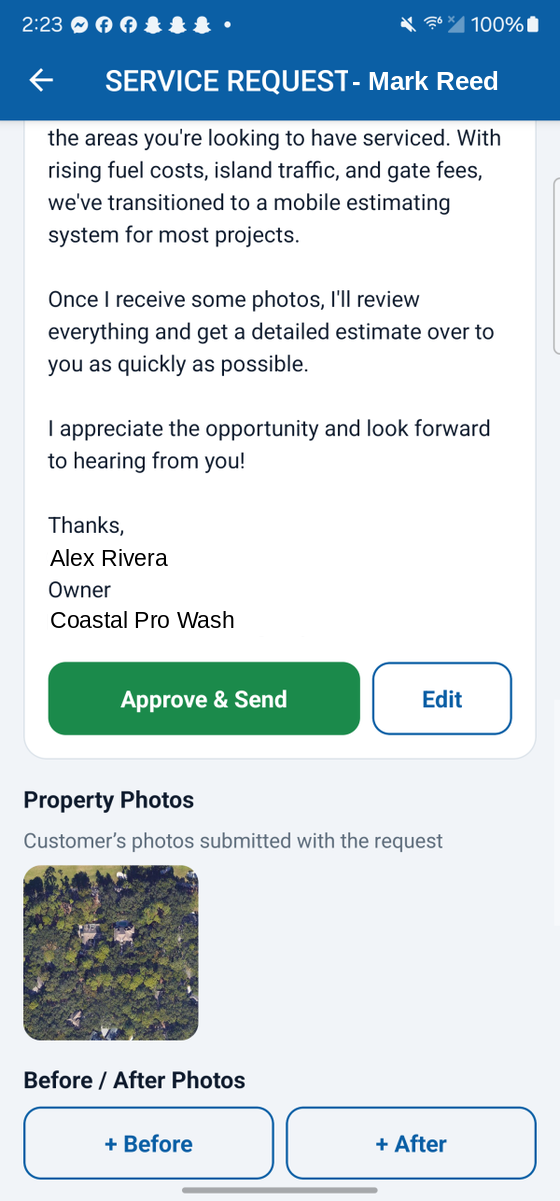
What “approve what matters” looks like: the draft, and your two buttons.
One tap, not one more app to run
Your whole job in the flow is to say yes.
The agent brings the work to a decision point and stops. You glance at the draft on your phone, approve it or edit it, and get back to the actual job. That's the deal: the software does the busywork, you keep the judgment.
- Read the draft in plain English, in your voice.
- Approve as-is, or tweak a line before it goes.
- Everything after the tap is handled: send, schedule, follow up.
The whole point